Network Architecture Guide (How the front and backend interact)
Explains how the front and backend interact in CloudCLI
Network Architecture Guide
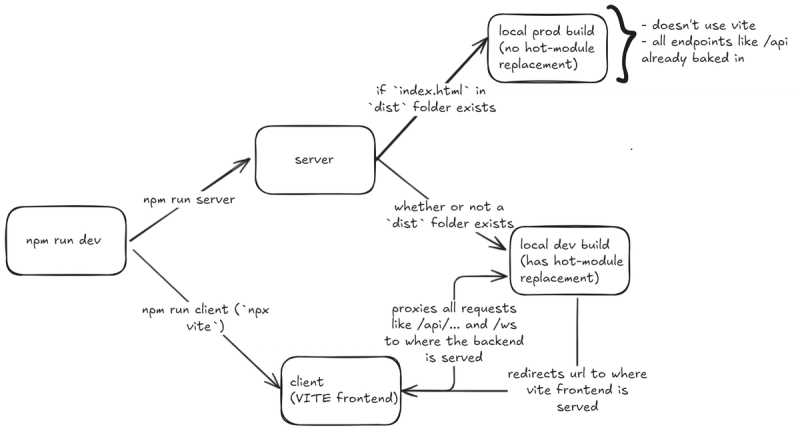
This document explains how networking works in this repo, why the project uses two ports in development, how HOST affects each server, and why desktop and mobile can behave differently.
High-Level Model
The app has two different runtime shapes:
-
Development mode
- A backend server runs on
SERVER_PORT(default3001) - A Vite frontend dev server runs on
VITE_PORT(default5173) - The browser loads the frontend from Vite
- Vite proxies API and WebSocket traffic back to the backend
- A backend server runs on
-
Built or production-like mode
- Only the backend server is required
- The backend serves the built frontend from
dist/ - API, frontend, and WebSockets all come from the same origin
Where the Networking Config Comes From
.env
It's sourced from the .env file in the project root. How it should be structured is documented in .env.example. The important variables are:
SERVER_PORT=3001VITE_PORT=5173HOST=0.0.0.0
Effective precedence
In practice, the order for the above variables is:
- Explicit CLI options or shell environment
.env- Hardcoded defaults in the code
Examples:
- Backend
SERVER_PORTcan be overridden bycloudcli --port 8080 - Backend
HOSTfalls back to0.0.0.0 - Frontend
VITE_PORTfalls back to5173
What HOST Means
HOST controls which network interface a server binds to.
Common values:
127.0.0.1orlocalhostor::1- Bind only to localhost
- Only the same machine can connect
0.0.0.0- Bind to all local interfaces
- Other devices on the same network can connect using your machine's IP
Important distinction:
0.0.0.0is a bind address, not a browser address- Clients never browse to
http://0.0.0.0:3001 - Clients browse to a real address such as
http://localhost:3001orhttp://10.41.126.107:3001
Backend Server Architecture
The backend lives in server/index.js.
It creates:
- An Express app
- A shared HTTP server
- A WebSocket server attached to that same HTTP server
Responsibilities:
- Mount
/api/*routes - Authenticate API requests
- Accept WebSocket connections
- Route WebSockets by path
- Serve
public/ - Serve
dist/when a build exists - Redirect frontend requests to Vite during dev when no build exists
WebSocket Endpoints
The backend exposes two main WebSocket paths on the backend port:
/ws- chat/session realtime channel
/shell- terminal/shell realtime channel
The WebSocket server is attached to the same backend HTTP server, so these are not separate ports.
Frontend Dev Server Architecture
The frontend dev server is configured in vite.config.js.
It reads:
HOSTSERVER_PORTVITE_PORT
Proxy behavior
In dev, Vite proxies:
/api-> backend/ws-> backend WebSocket server/shell-> backend WebSocket server
The proxy target uses:
localhostwhenHOST=0.0.0.0or any loopback address.- otherwise the specific
HOST
If the page is loaded from :5173 or any VITE_PORT
- Browser sends
/api/*,/ws, and/shellto:5173 - Vite receives them
- Vite proxies them to the backend on
:3001
If the page is loaded from :3001
- Browser sends
/api/*,/ws, and/shelldirectly to:3001 - No Vite proxy is involved
What happens when you open http://localhost:3001
The backend checks whether dist/index.html exists.
- If it exists, the backend serves the built app directly
- If it does not exist, the backend redirects the browser to the Vite dev server on
VITE_PORT
Notes
What happens when the HOST is set to 0.0.0.0
When Vite is bound to 0.0.0.0, it enumerates all local interfaces and prints connectable addresses for them.
Examples:
10.x.x.x172.x.x.x192.168.x.x
They are the same Vite server on the same port, exposed through multiple network adapters such as:
- Wi-Fi
- Ethernet
- VPN
- WSL / Hyper-V virtual adapters
- Docker virtual adapters